

News + Thought
AI agents vs chatbots: what changes when the agent starts the conversation?
We seem to have come full circle with AI: from chat, through agents, and back to chat again. Except now the conversation happens with work occurring in the background, with the system coming back only when it has a result or needs a decision. In my own work, the clearest difference between AI agents and chatbots is who starts the conversation.
Initially, nothing happened until you typed something. Now an agent might be working in the background and come back because it’s finished, hit a problem, or needs you to make a decision.
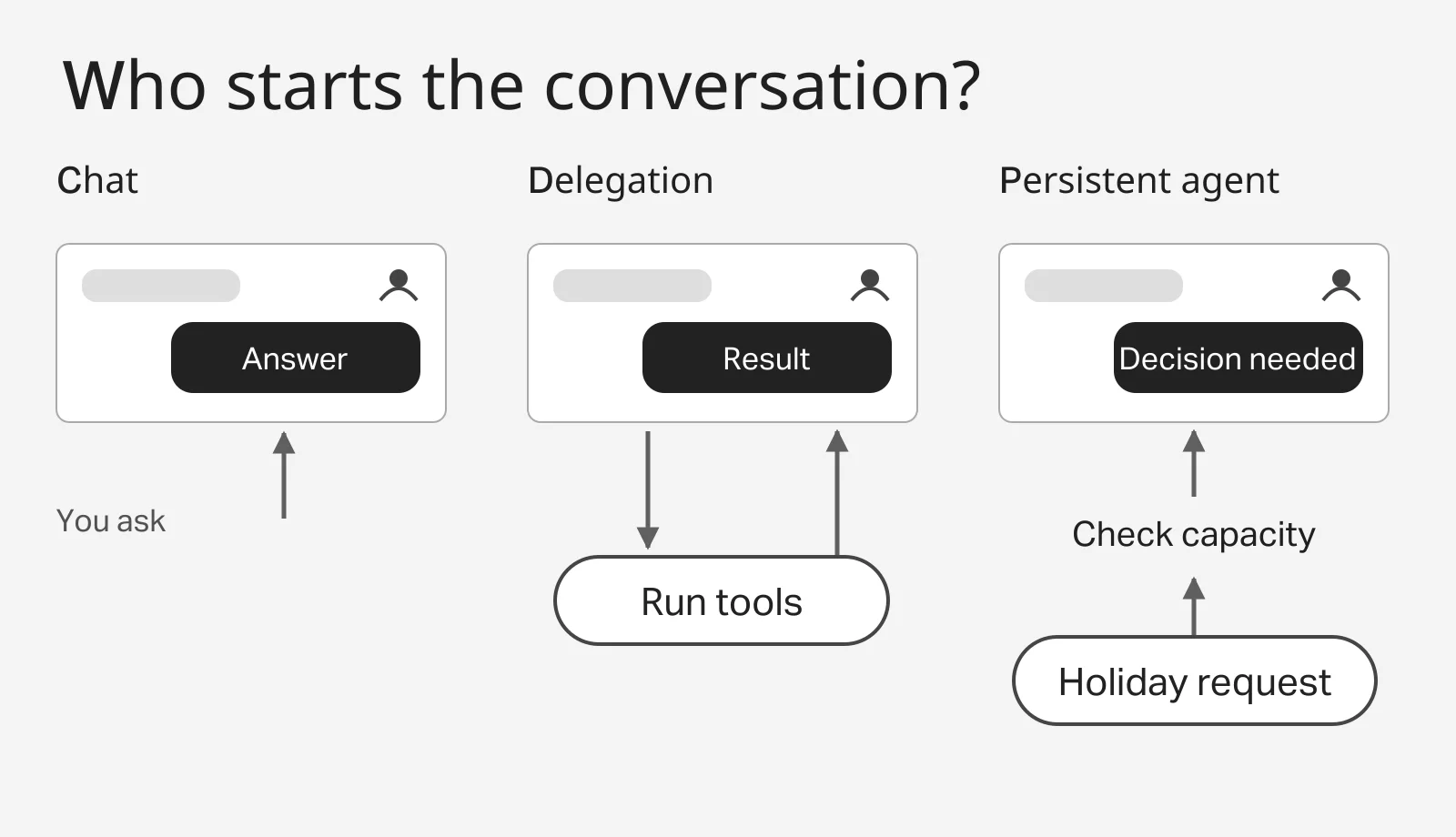
What happens between conversations
I have used AI for scoping development projects and for the development work itself. It was always quite linear. I’d kick things off, work through it with the AI and decide when we were finished. If something else occurred to me afterwards, I’d go back and pick up the conversation myself.
That's changed. I can still go back with a follow-up, but I’m no longer the only one who can spot a reason to revisit the work. An agent can pick up on something that’s changed while my attention is elsewhere and come back to me.
I use a dot in ChatGPT for this, and some of my colleagues use Grok Bot. My dot keeps an eye on my emails, feeds, Slack, logs and the other agents I’m working with. I used to go through those sources myself to see what needed my attention. Instead, the agent now comes to me when it has something to flag or a question it needs me to answer.
You can see the same shift across other AI providers. In Microsoft Copilot Studio, an email arriving in a monitored Outlook inbox can start an agent. Salesforce has an Agentforce example where creating or updating a support case sends it to agents for review. In both cases, the work starts because something has happened that needs attention, not because a person asked it.
A staffing question I hadn’t asked
One example came from the team’s holiday requests. My dot picked up that the dates people were asking for would leave us short on some client projects later in the year. I wasn’t actively working on those projects, and we hadn’t started forecasting for that period yet. The first I heard about the clash was from the agent.
My dot came back with a few ways to move the project timelines around and still meet the clients’ requirements. It showed me the resource allocation on Gantt charts, along with the allowances it had made and the tolerances it suggested. That extra evidence meant I could check for myself how much room there was in the schedule before choosing an option.
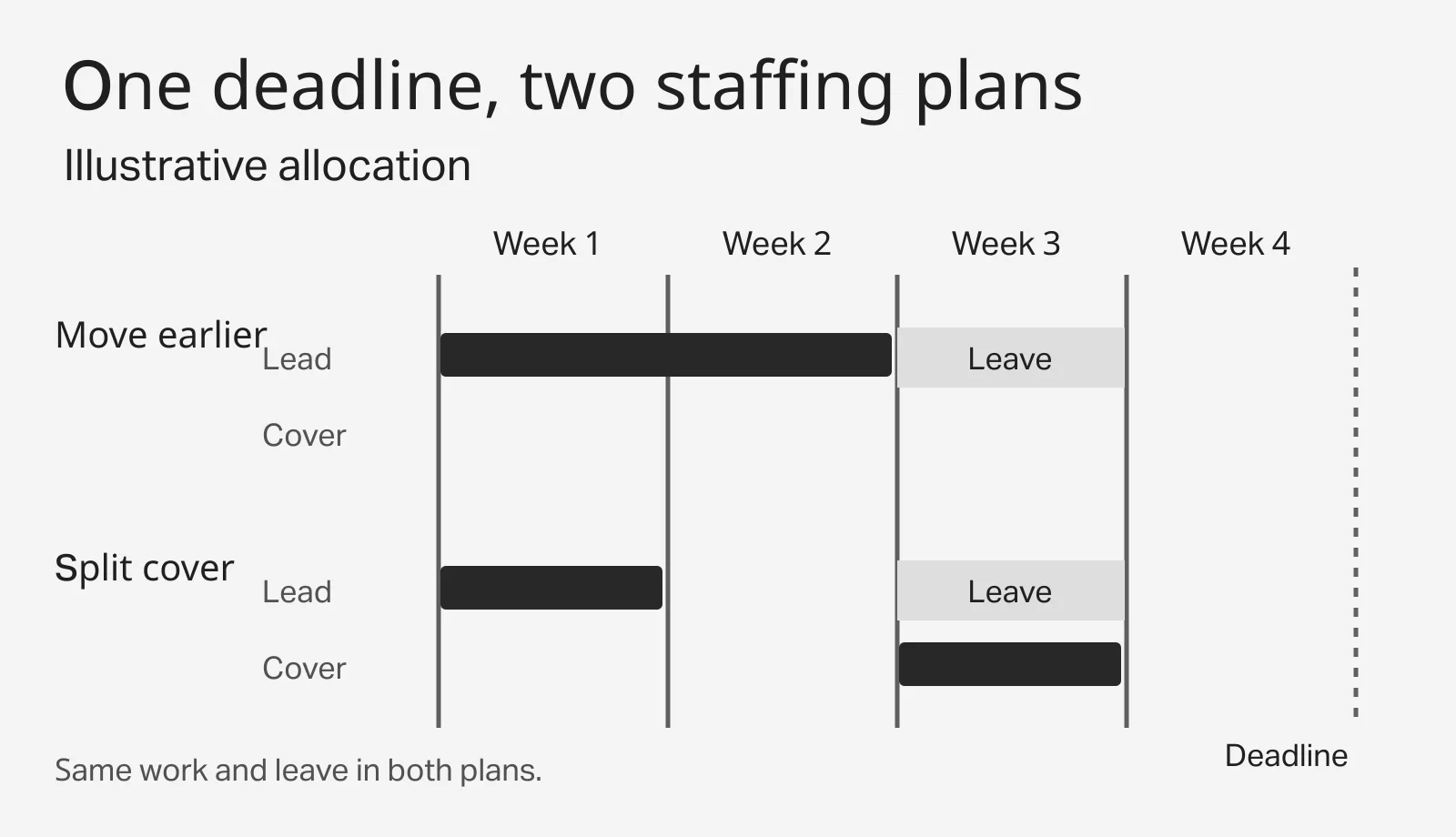
It also drafted the messages to the account managers and HR. By the time it came back to me, my part was to review the options, choose the option I preferred and approve the messages before they went out.
Supervising AI agents: where I want the agent to stop
This is where autonomy gets more complicated. You need to decide which actions the system can take independently, which require approval, and how it should behave when the boundaries aren’t clear.
The first thing I checked was whether the charts matched my understanding of the projects and their timelines. Dates tend to shift once a project is under way. Even if two options meet the deadline on paper, what I know about the clients, the projects, and the people doing the work feeds into which one I’d back.
If a change commits the team, I’d expect the agent to get my input. Agreeing to move work between projects means someone has to stand behind the new dates. In this case that was my decision, which is why having the charts and the draft messages together mattered. We’ve explored the same question of who gets to decide in our piece on graph engineering for AI agents.
Sometimes it’s a colleague’s judgement that’s needed. I’ve seen my dot pass something on to a colleague through Slack. Their agent was monitoring Slack and picked up the message there. In future, I can imagine my agent passing an issue directly to theirs. If the decision belongs to my colleague, there’s no reason for me to be in the middle of that exchange.
When is an interruption worthwhile?
I only want an interruption when someone needs to make a decision. If the team can absorb a change within the existing schedule, there’s nothing for me to do. Enough updates like that and I’d start ignoring the agent, including when something really did need my attention.
That’s where a tuning phase comes in useful, a bit like a ‘getting to know you’ survey. The agent could suggest things it might flag and ask which ones I’d want to hear about. Then I could give it feedback in either direction as we worked together. Sometimes that would be ‘you could have left that with the team’. Just as important would be ‘I wish you’d brought that to me earlier’.
I think we’ll increasingly judge these systems by how well they handle the work between conversations. In this case, the question of whether we could cover those projects came up earlier than it would have done in our usual forecasting. By the time it reached me, I had options I could check and a decision I could actually take. That boundary is one of the first things I’d agree on an AI development project. When the agent belongs to a customer, there’s an earlier question for the brand: what can their assistant find out about you?
Frequently Asked Questions
What makes an AI agent persistent?
It can keep working on a responsibility across interactions. For a planning task, that means a new request or a revised deadline can give it a reason to revisit an earlier conclusion and bring the change to someone’s attention.
What’s the difference between a bot and an agent here?
The terms overlap. A chat bot can answer a message or send an update when something happens. I use ‘agent’ for a system that can choose steps and tools to carry out work I’ve delegated. Either can respond to a request or an event. What makes Dots persistent in this example is that the responsibility carries on between conversations.
Could an ordinary alert catch a staffing conflict?
Yes. If dates, allocation and capacity are recorded consistently in one planning system, a rule may catch an overlap perfectly well. The interesting case here was a conflict involving holiday requests and projects I wasn’t following, before we’d started the usual forecasting.
How much access does an agent need?
Start with the decision it’s helping someone make. Checking a staffing conflict calls for access to relevant dates, availability and commitments. Changing a project plan or sending someone a message is a separate capability with consequences for other people.
What makes a recommendation easy to review?
Show the options, the assumptions behind each one and what would change if you chose it. For a staffing decision, a chart showing who is allocated when gives the reviewer something concrete to check against their knowledge of the team.
Who decides when a proposal is ready to send?
In my example, I do. The agent can prepare the options and draft the messages. I review the evidence, choose the option I prefer and approve what goes to the account managers and HR.