

News + Thought
WordPress alternatives for business websites: would you choose WordPress again?
I think WordPress gets chosen by default too often, largely because it’s familiar. When I look at WordPress alternatives for business websites, I’d want to know who will maintain it, what the editors need and which other systems it has to work with.
Often the client already has a WordPress site, or the people publishing content have used it for years. That experience has value. A move means asking people who know how to get their work done to learn another system. Other times it’s the buyer who knows the name. They see how many sites run on WordPress and, as far as they’re concerned, the platform decision is already made. Those are quite different starting points for a conversation about what to build next.
What would you actually have to replace?
I’d start by asking the team to show me how a piece of content goes from draft to publication. Which features do they actually use? Where do plugins come into the process, and what does their hosting setup take care of? Walking through a real edit helps me see what they’d need to carry over. An approval step might be straightforward to reproduce in another CMS. A plugin that passes an approved item into another system might take considerably more work to replace.
Then I’d ask what concerns them about moving. Do they particularly like the editing interface? How much time would the team need to learn a new one? Are they worried about the disruption of a change, or have they identified a cost that makes it difficult to justify? A team can have good reasons to stay even when there’s very little technical lock-in.
What are you committing to maintain?
I think the case for staying on WordPress is getting narrower. Familiarity is worth something, but I’d weigh it against what we’re asking the client to maintain over the next few years. My concern with the core is that it still reflects decisions that made sense when WordPress was built. If I were designing a CMS from scratch today, I’d make different choices. The WordPress team has to account for sites, themes and plugins that still depend on the old ones. On a rebuild, I’d bring that back to the editorial team. Which plugins does your publishing workflow depend on, and who owns the work if one of them stops being maintained?
Then there are the plugins a particular site relies on. A plugin can be critical to the business even if its maintainer has moved on. Who would know, and who would own the job of replacing it?
Scale matters here, too. A weakness in a widely installed plugin gives attackers a reason to look for the same weakness across many sites. For a client, the practical question is how quickly someone would know their site was affected, test an update against the workflows they rely on and get it live. That ongoing work belongs in the cost of staying, alongside the one-off cost of moving.
WordPress’s own hardening guide is worth reading alongside a hosting proposal. It covers updates, plugins, backups and monitoring. I’d ask who owns each of those on this particular site. A managed host might take care of part of the job. Someone still needs to check that an editor can preview and publish a campaign after an update.
Which alternatives belong on the shortlist?
For a rebuild, I’d start with a shortlist of around ten CMS options. I’d include both headless platforms and ones that handle the website as well as the content. If the editors tell me they like visual editing, I want to know what they mean by that in their day-to-day work. That gives us something to compare across the shortlist before we settle on an architecture.
For example, these ten alternatives to WordPress might make an initial list in November 2026. It’s a snapshot. A change to seat pricing, hosting or an editor feature could give me a different list next month, let alone next year. The brief would decide which ones earned a demo.
EmDash — Cloudflare’s open-source CMS is worth a look if plugin security is a concern. I’d test whether its sandboxed plugins can support the integrations the client actually needs.
Drupal — worth a look when several editorial teams need different permissions and approval steps.
Craft CMS — for a bespoke site where the developer can tailor content fields to the way editors work.
Wagtail — a natural candidate if the client already maintains a Python and Django application.
Webflow — for a design team that wants to build and update campaign pages on a visual canvas.
Storyblok — for editors who want a visual preview while developers run the front end separately.
Contentful — for a business that needs to publish the same product or brand content across several channels.
Sanity — where the team wants to model content in detail and customise the editing workspace.
Strapi — for a team looking for an open-source headless CMS with the option to run it on its own infrastructure.
Payload — worth exploring when a TypeScript team wants to build the CMS into a custom application.
For a brand with a small editorial team and a single site, I’d consider an integrated CMS with managed hosting. For a brand sharing collection details across several sites or channels, I’d look at a headless CMS that lets each experience use the same content. And if most of what the editors do is merchandise a shop, the commerce platform’s own editor deserves a look. Adding a separate CMS means giving someone another system to own.
Cost is usually the first thing I use to narrow that list. Once several platforms can do what the editors need, their feature lists often look fairly similar. I’d price them for the team that will actually use them. How many people need a paid seat? Is hosting included, and if we have to host the website separately, what does that add? Then I’d put the cost of moving alongside the recurring licence, hosting and maintenance costs. That gives the client a view of the total cost of ownership over the next few years. For most businesses I speak to, that matters a great deal.
Give the editors a real page to build
Once we’ve narrowed the list, I’d set up a demo instance of each finalist and walk the editors through around three tasks they do regularly. I’d use the same tasks in each demo so the team can judge the differences for themselves. What feels familiar on a feature list can feel quite different when you’re the person trying to get a page ready to publish.
For a luxury brand, I’d use a seasonal collection launch. Give the editors last season’s page, a folder of new images and the approved autumn copy. Ask them to prepare a draft for review. Watch what happens when the new headline runs to two lines or the strongest photograph has a different crop. That’s often what someone means when they tell you they want visual editing. They want to see the page they’re about to put in front of a customer.
I’d try the same brief through AI where the integration supports it. An editor might say, ‘Use last season’s collection page as the starting point for an autumn preview. Keep the layout, add this approved copy and these images, and leave it in draft.’ Then they can open the preview, check the choices and adjust the page themselves. I’d want to know how much work that actually saved once they’d finished checking it.
Helping teams judge where AI could make their own work easier is part of our core offering at Skywire. A CMS selection gives us a practical opportunity to do that. By the end of the demo the editors have a page they can assess, the technical team knows what it would have to support, and the client has a cost for each option. That’s the point at which I’d want to make a platform decision. That editorial workflow is one place to test AI development. I’d also ask each supplier to show how the published collection page exposes the product details that matter for visibility in AI search.
Frequently Asked Questions
Is an older WordPress site automatically insecure?
Age alone tells you very little about the exposure of an individual site. I’d check the versions actually running, whether its dependencies still receive updates, and who can apply and test those updates. My reservations about the architecture are a separate consideration when choosing a platform for the next build.
When might you keep WordPress?
If an existing workflow is valuable, the site is adequately maintained and moving would cost more than the improvement is worth, staying can be a sound decision. I’d revisit the choice when a rebuild is already on the table.
Headless CMS vs WordPress: what are you actually comparing?
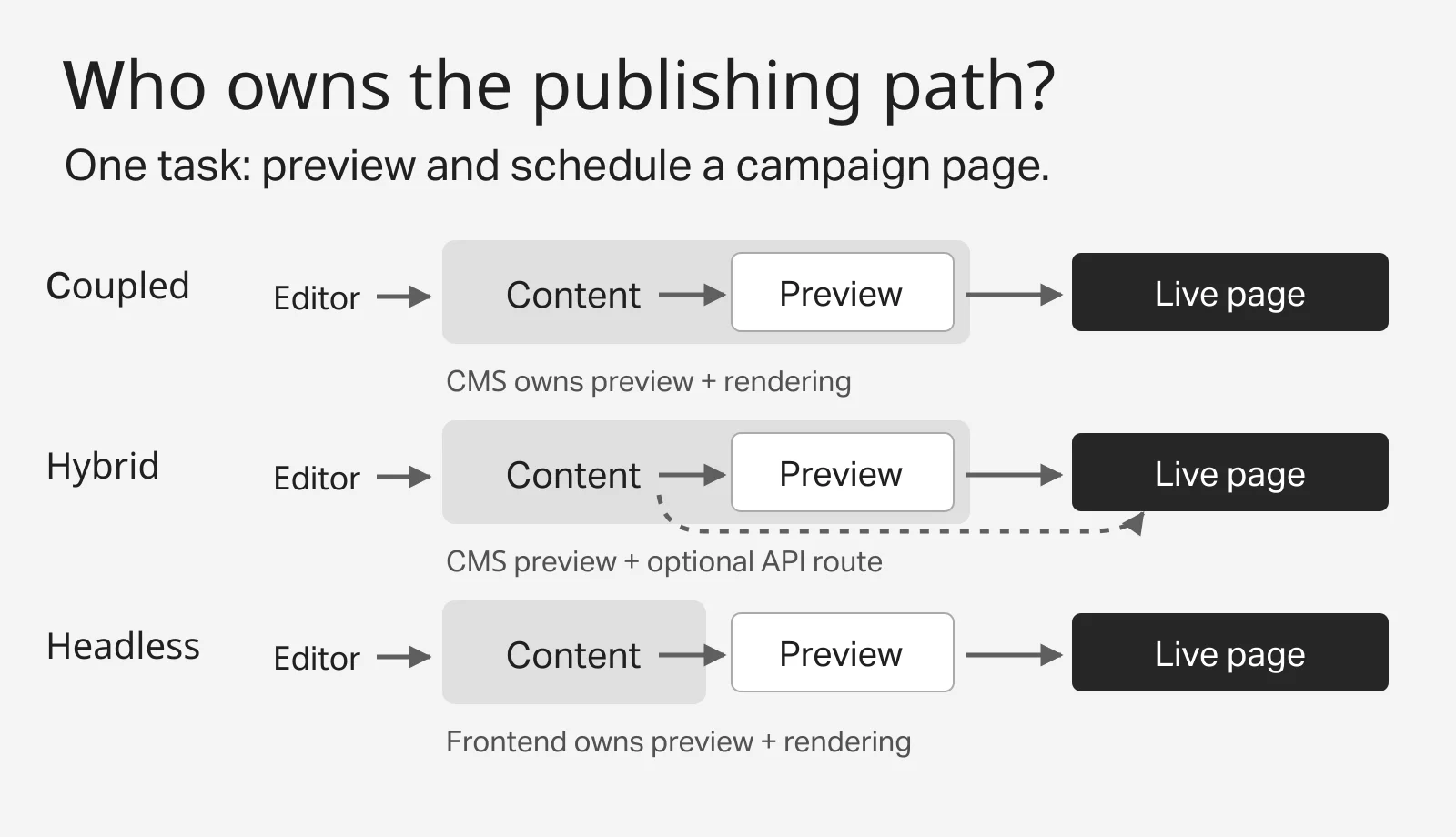
Headless describes how the site gets its content. WordPress can run headless too, with a separate front end reading its API. I’d compare two actual setups. Who hosts and updates each part? Can an editor preview an unpublished change on the page where it will appear? Those answers tell you more about the cost and the editorial workflow than either label.
Can a headless CMS offer a visual editing experience?
It can, depending on the CMS and how the preview is integrated with the website. Ask to see an editor change a real page and preview the result. Include the cost of building and maintaining that integration in the comparison.
How should we compare costs?
Use the same team size, set of sites and time period for each option. Include licences, seats, hosting, support and migration. Give the existing site a column as well, including the cost of the work it needs over that period.
Does the CMS need its own AI assistant?
Start with the task an editor wants help with. In the seasonal campaign example, the important questions are whether the assistant can use the approved material, respect the editor’s permissions and leave a draft they can inspect. Try it on each finalist.