

News + Thought
What happens when an AI agent visits your website? Our first WebMCP experiment
We were already rewriting parts of the Skywire site when we decided to try WebMCP. I wanted a small test we could run on our own site. If we were going to suggest it to a client, I’d want to be able to show them a working example first. We started with a task visitors can already do on our site: finding case studies by industry or service.
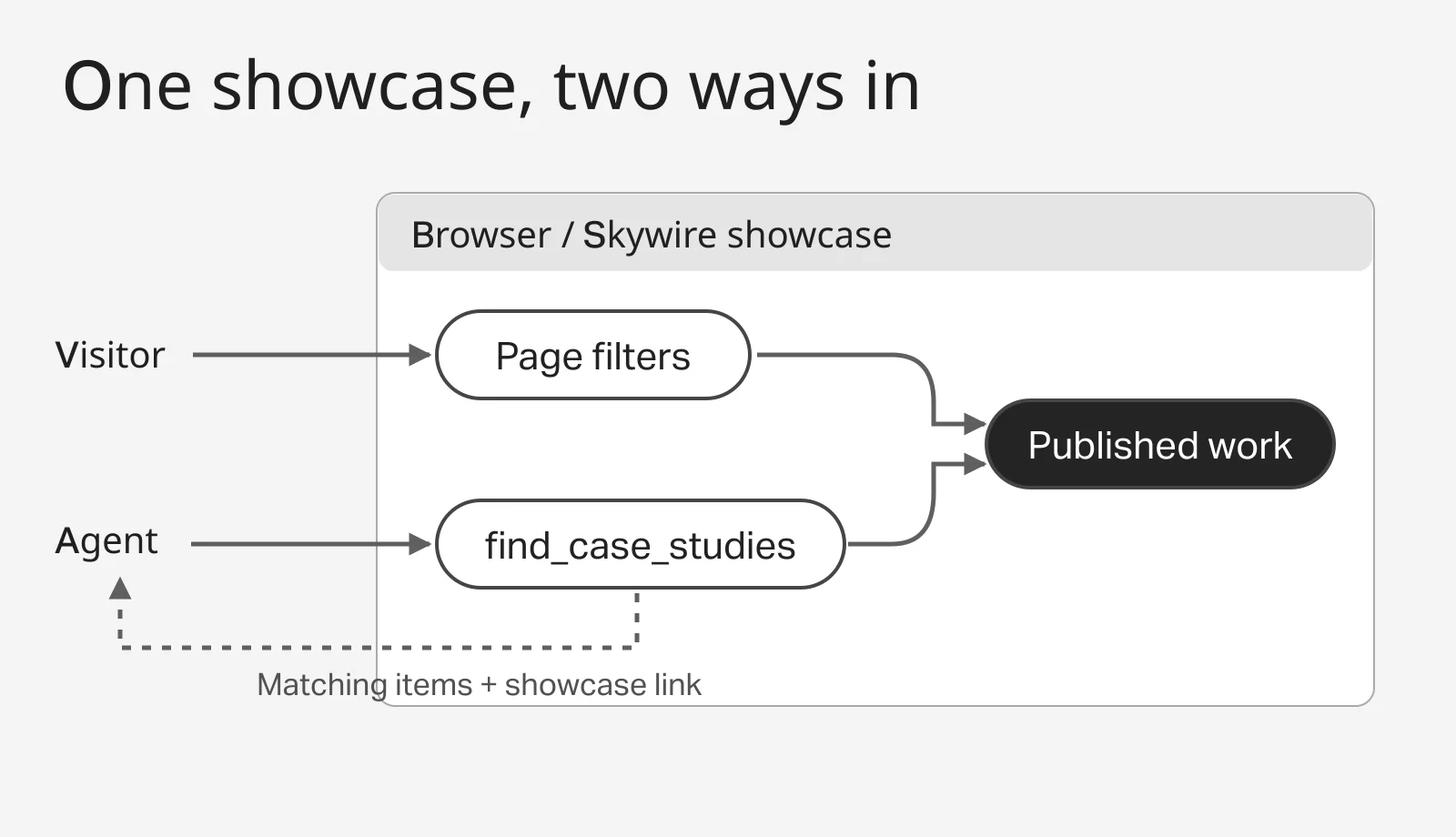
WebMCP gives a website a way to describe specific things an agent can do in a browser that supports it. In our case, the site knows how to find work by industry and service. By making that available as a tool, we give an agent a way to ask the site for those results directly.
What appeals to me about WebMCP is that we can design the showcase around how people choose an agency. A visitor might recognise a client in one of the images, browse a few projects or use the filters to narrow things down. An agent can ask the site directly for case studies in a particular industry or service. Both draw on the same published work and filter by industry and service, so we can give the agent a route that suits it while keeping the experience we designed for visitors.
A WebMCP example: would an agent find our case-study tool?
I wanted to see whether an agent visiting our site would use the case-study tool. In our test, it did call the tool. Imagine a jewellery brand considering Skywire for an ecommerce project. They might ask their agent, “Have a look at Skywire’s site. What have they done for jewellery brands, and which examples should I read before we speak to them?”
There’s no mention of WebMCP in that example question. For the jewellery brand, calling the tool is only the first step. I’d want the agent to open the case studies it found and check what we actually did. A brand name on its own tells you very little about whether the project is relevant.
We split discovery into three small steps. An agent that lands elsewhere on the site can open the showcase. Once there, it can ask which industries and services we list, then search using those filters. This matters when the visitor’s description of a project differs from the terms we use to categorise our work.
The results include titles, published summaries and links. We also return a link that opens the same filtered view for the visitor. An agent can do the legwork and still give someone a sensible place to pick up the search if they’d like to explore for themselves.
What should happen when there’s no match?
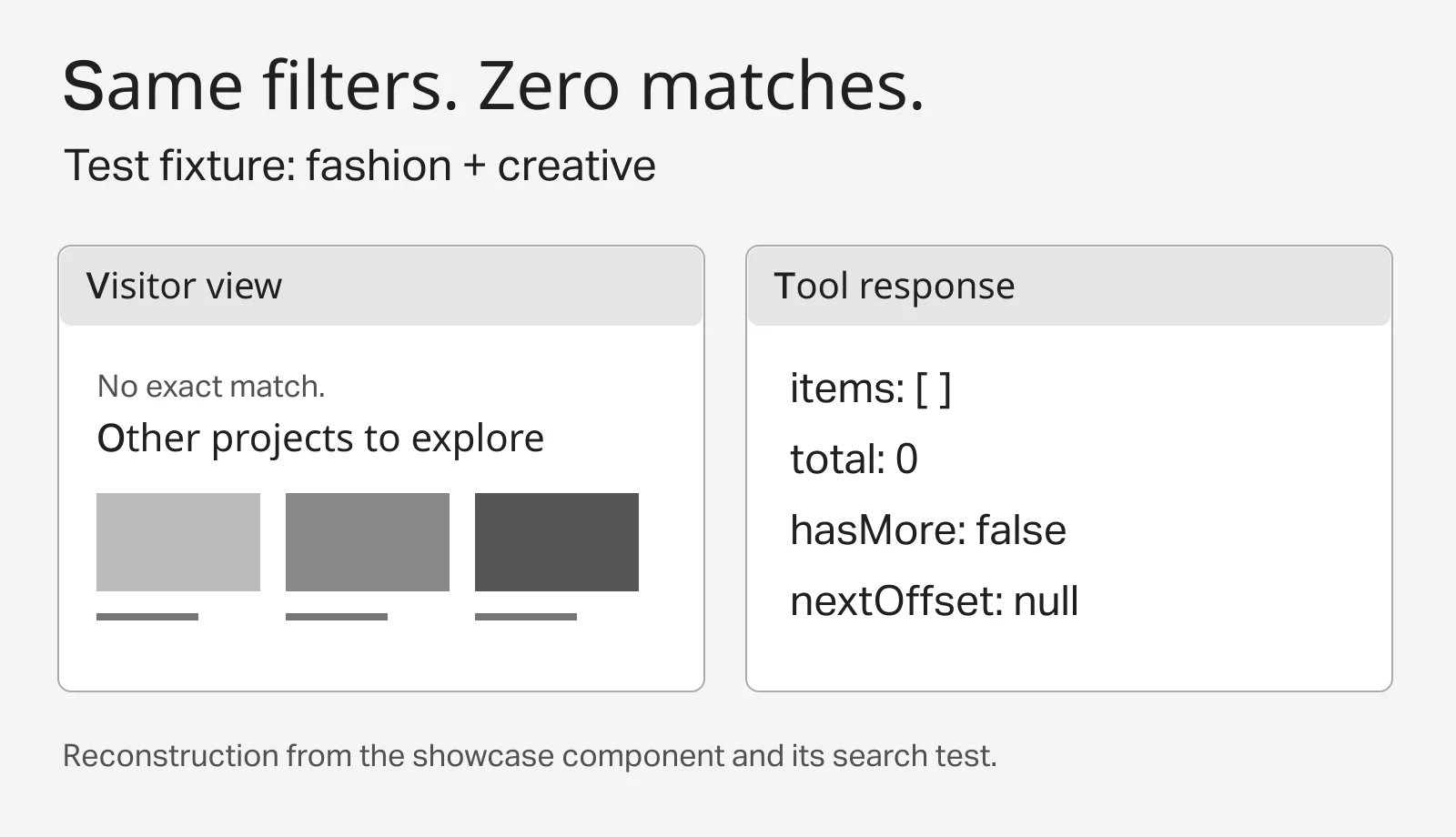
One small decision illustrates why I’d want the team that owns the website involved in designing its tools. On a showcase page, it can be helpful to suggest other projects when a particular combination of filters turns up nothing. If an agent asks specifically for jewellery projects involving a particular service, those suggestions can easily end up in its answer as examples of work we’ve done in both areas.
Our search tool returns an empty list in that situation. The agent can broaden the search, but it has to make that choice explicitly. That’s a small detail with a commercial consequence. I want a prospective client to be able to open a case study and find the experience the agent said was there.
From finding work to making an enquiry
Where we plan to take this next is enquiries. Suppose the jewellery brand finds a project it wants to talk to us about. Its agent could use that conversation to draft an enquiry for the visitor to review, including which project caught their eye and what they’d like to discuss with us. I’d want that last step to be as easy as possible for the visitor. If they’ve read the enquiry in the conversation and said ‘yes, send it’, I’d like that to be enough. They’ve already explained what they need.
That would give us a different question to test. Today our tools read published information. Sending an enquiry would put someone’s words and contact details in front of our team. I’d want the visitor to see exactly what was going to Skywire and be able to change it before sending.
Where I’d try this on a client site
Would I recommend trying WebMCP on a client site? Yes. I think the effort involved in a small first test is fairly low, and the client can decide exactly which features to make available. There’s a competitive reason to start early, too. By the time customers are asking to use a site this way, you could already know which parts work well for them.
Product configurators are where I can really see this working. Imagine someone ordering a bespoke pair of loafers. They could tell their agent, ‘I’d like the upper in navy suede, a smooth leather strap and stitching to match. What colours could I have for the strap?’ The configurator knows which leathers the maker offers for that part of the shoe. The agent could bring back two or three available combinations for the customer to compare. A brand could start by exposing just those choices. It could then see whether the shortlist helps customers choose before deciding whether to let an agent prepare a quote.
Where the customer sees those designs is a choice for the brand. Some clients might be happy to show the shortlist in the conversation because it’s easier for the customer. Others might want each option to open straight into that design on their site. With a bespoke shoe, the customer might want to zoom in on the grain of the strap or see how a burgundy leather looks against the navy suede. That’s where the brand’s own design tools, imagery and presentation can make a difference. I’d want the choices the customer has already made to carry across. For brands, we look at both ends of that journey. Our work on SEO for LLMs looks at how an assistant finds the brand in the first place. Our AI development work covers what the visitor can ask it to do once they arrive.
Frequently Asked Questions
Does a site need a chatbot to use WebMCP?
No. Skywire’s tools are there for an agent working with the visitor through a compatible browser. The visitor can keep using the assistant where they started the conversation.
What happens in a browser without WebMCP support?
On Skywire’s site, the showcase loads with its usual cards and filters. The page checks for browser support before it registers the tools. A visitor can still browse the work and send an enquiry in the usual way.
Does the agent get access to the CMS?
Our tools read the published data already available to the showcase. They return information about matching projects and links to read more. The agent has no reason to open the CMS or see unpublished client work.
Can the agent search for anything on the site?
The showcase tool filters projects by industry and service. A more detailed question, such as what a particular integration involved, requires reading the linked case study. That distinction matters when deciding what evidence belongs in an answer.
Could a brand choose to expose only part of a configurator?
Yes. A first experiment could let an agent check which colours and materials are available for the upper, strap and lining. Preparing a quote or placing an order would be separate capabilities for the brand to consider.
How would you judge whether the experiment is worth extending?
I’d look at whether agents discover the tools on relevant requests, whether the results help people find suitable work and where they choose to go next. A successful tool call answers a technical question. A visitor finding a project worth asking us about would tell us something more.